GUANGZHOU HUAHUI AUTO PARTS LTD
aftermarket vehicle a/c products
Home / All / Auto Parking Heater / TUYOUNG China produce auto a/c system Parking Heater With intelligent start-stop
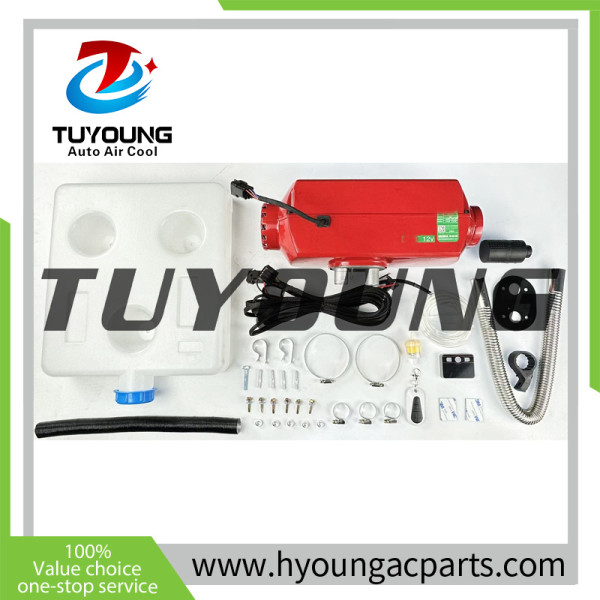
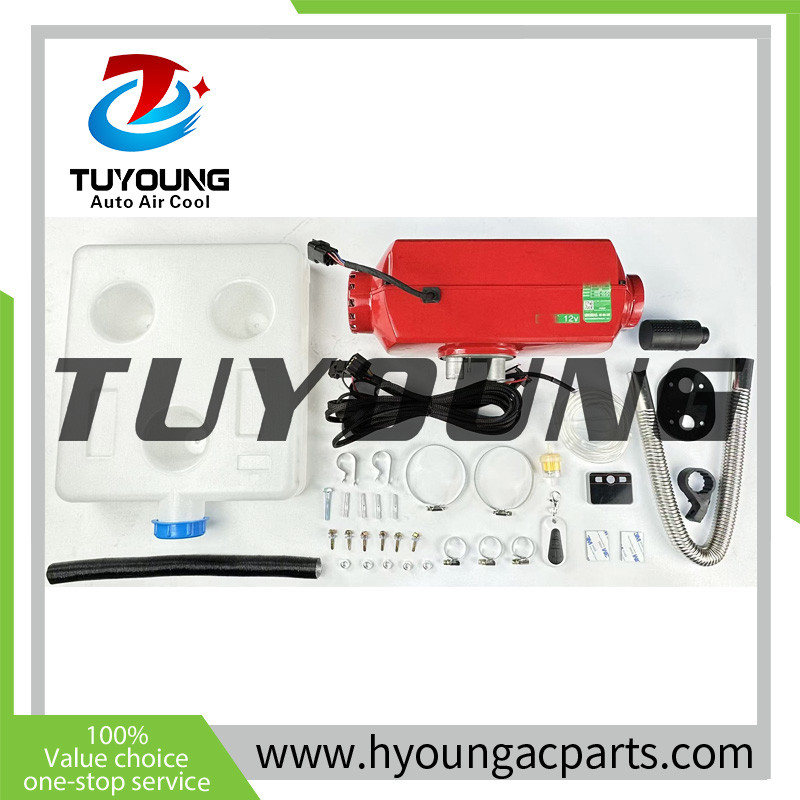
TUYOUNG China produce auto a/c system Parking Heater With intelligent start-stop
Detail Information
TUYOUNG China produce aftermarket auto a/c parking heating
TUYOUNG ID: HY-PH008
Details:
With intelligent start-stop
Highland version
5KW
12V/24V
Color: red
Fuel: Diesel oil
Independent heating unit
Full car warming speed
Instructions for use
11. Setting Temperature Mode Stop and Oil Pump Flow: Disconnect the switch cable. Then press and hold the power button. Then plug in the switch cable. The screen will display "CF," followed by a number. Release the switch. Multiply the displayed number by 5 and add 1. Take the last digit of the result, for example, 2*5+1, which equals 6. Press the up button to select 6, then press the power button to enter the setting function.
The first item displayed is: Power Voltage, which will sequentially show 24V power supply, -12V power supply, and -0A automatic voltage. In 0A state, press the power button to confirm. Automatic voltage matching will be achieved.
Then the screen will display "22," indicating a 22 oil pump. Pressing the up button will display "28," indicating a 28 oil pump. Pressing the up button again will display "0A," indicating automatic oil pump matching.
Select the oil pump flow rate you want to match and press the power button to confirm. The oil pump setting is now complete.
After the oil pump setting is complete, the screen will display "t5" to enable the temperature mode stop function, and "t----" to disable the temperature mode stop function. To enable it, in the "t5" state, press the power button to confirm. After all settings are complete, the screen will display "5u" and then the device will shut down in 5 seconds, indicating that all settings are complete.
Please send your message to us
- Phone
- *Title
- *Content
MOBILE WEB

Company
Categories
- Auto AC Compressors
- Hyundai Kia ac compressors
- Acura ac compressors
- Alfa Romeo ac compressors
- Aston Martin ac compressors
- Audi Ac Compressors
- BMW ac compressors
- Buick Ac Compressors
- Cadillac ac compressors
- Caterpillar ac compressors
- Chevrolet ac compressors
- Chrysler ac compressors
- Dodge ac compressors
- Ferrari ac compressors
- Fiat ac compressors
- Ford Ac Compressors
- Foton ac compressors
- Freightliner Ac Compressors
- GMC Ac Compressors
- Hino Ac Compressors
- Honda Ac Compressors
- Infiniti Ac Compressors
- International Ac Compressors
- Isuzu Ac Compressors
- Jaguar Ac Compressors
- Jeep Ac Compressors
- Kenworth Ac Compressors
- Lamborghini ac compressors
- Land Rover ac compressors
- Lexus Ac Compressors
- Lotus Ac Compressors
- Lincoln Ac Compressors
- Mack Ac Compressors
- Man Ac Compressors
- Maserati Ac Compressors
- Mazda Ac Compressors
- Mclaren Ac Compressors
- Mercedes Benz ac compressors
- Mini Ac Compressors
- Mitsubishi Ac Compressors
- Nissan Ac Compressors
- Peugeot Ac Compressors
- Porsche Ac Compressor
- Ram Ac Compressor
- Renault Ac Compressor
- Scania Ac Compressor
- Scion Ac Compressors
- Seat Ac Compressor
- Smart Ac Compressor
- Subaru Ac Compressor
- Suzuki Ac Compressor
- Tesla Ac Compressors
- Toyota ac compressors
- Volkswagen Ac Compressors
- Volvo ac compressors
- Western Star ac compressors
- Kubota ac compressors
- Komatsu ac compressors
- John Deere ac compressors
- New Holland Ac Compressor
- Case Ac Compressor
- Navistar ac compressors
- GM/saturn ac compressors
- TM series bus ac compressors
- Sanden series Ac Compressor
- Dacia ac compressors
- Ssangyong Ac Compressors
- Opel Ac Compressors
- Rolls-Royce ac compressors
- Hitachi Ac Compressors
- DAF Ac Compressors
- Daewoo Ac Compressors
- Sany Ac Compressor
- Iveco Ac Compressors
- Geely Ac Compressors
- Saab Ac Compressor
- Fendt ac compressors
- Lancia auto ac compressors
- Deutz Ac Compressor
- Chery Ac Compressor
- Claas Ac Compressors
- Skado ac compressors
- Seat ac compressors
- Greet Wall Ac Compressor
- Lada Vesta ac compressors
- Electric ac compressor
- Terex Ac Compressors
- AGCO Ac Compressor
- JCB Ac Compressor
- Peterbilt Ac Compressor
- Scaina Ac Compressor
- Doosan AC compressor
- Geely ac compressors
- Construction vehicle Ac Compressors
- Hitachi ac Compressprs
- Bentley Ac Compressor
- Pontiac ac compressors
- Ram ac compressors
- JAC ac compressors
- Bobcat AC Compressor
- Kato Crane Ac Compressor
- DongFeng AC Compressor
- Trumpchi AC Compressor
- Changan ac compressors
- BYD Ac Compressor
- Chery ac compressors
- Lifan AC Compressors
- Ligier AC Compressor
- Proton ac compressors
- Daihatsu ac compressor
- Scacman ac compressors
- Zeekr ac compressors
- Lixiang ac compressor
- Mahindra ac compressor
- ROEWE ac compressor
- Wuling AC Compressor
- NIO AC Compressor
- XPENG AC Compressor
- Huawei AITO AC Compressor
- Maxus AC Compressor
- BAIC AC Compressor
- AC Compressor Clutch items
- AC compressor components
- Auto ac Evaporators
- Auto ac Evaporator Cores
- Toyota auto ac Evaporator Cores
- Chevrolet
- Audi
- BMW
- Buick
- Chrysler
- Dodge
- Fiat
- Ford
- Hino
- Honda
- Infiniti
- Isuzu
- Kenworth
- Freightliner
- Mack
- Man
- Mazda
- Mercedes Benz
- Mitsubishi
- Nissan
- Navistar
- Peugeot
- Porsche
- Renault
- Scania
- Subaru
- Suzuki
- Toyota
- Volkswagen
- Volvo
- Western Star
- Kubota
- Komatsu
- John Deere
- New Holland
- Case
- Hyundai Kia auto ac evaporators
- Lexus auto ac evaporator cores
- Caterpillar
- excavator
- Kia
- Hyundai
- Citroën
- Acura
- Hitachi
- Hyundai
- Doosan
- Kobelco
- Yanmar
- Maserati
- Jeep
- Land Rover
- chevrolet
- Doowon
- Deawon
- Citgo
- UD truck
- IVECO
- Opel
- Renault
- Chery
- tesla
- Great Wall AC Evaporator Cores
- Cadillac
- Cadillac
- Claas
- Claas
- Universal ac evaporator core
- Underdash Air Conditioner
- Heater Core Aluminum
- Auto ac Evaporator Cores
- Auto AC Condensers
- Caterpillar
- Acura
- Alfa Romeo
- Audi
- BMW
- Buick
- Cadillac
- Chevrolet
- Chrysler
- Dodge
- Ferrari
- Fiat
- Ford
- Foton
- Freightliner
- GMC
- Hino
- Honda
- Infiniti
- International
- Isuzu
- Jaguar
- Jeep
- Kenworth
- Lamborghini
- Land Rover
- Lexus
- Lotus
- Lincoln
- Mack
- Man
- Maserati
- Mazda
- Mclaren
- Mercedes Benz
- Mini
- Mitsubishi
- Mitsubishi Fuso
- Nissan
- Navistar
- Peugeot
- Porsche
- Renault
- Scania
- Scion
- Seat
- Smart
- Subaru
- Suzuki
- Tesla
- Toyota
- Volkswagen
- Volvo
- Western Star
- Kubota
- Komatsu
- John Deere
- New Holland
- Case
- Hyundai Kia ac condensers
- DAF
- IVECO
- ALMERA CLASSIC
- ALMERA CLASSIC
- Jiangling Kairui N800
- Ssangyong
- Kia Optima
- Hyundai Creta
- Kia
- Kavasaki loder
- denso
- ALPINA
- Universal vehicle
- JCB AC Condenser
- Daihatsu Ac Radiator
- DOOSAN ac condenser
- Hitachi
- Chery
- Genesis
- Liebherr AC Condenser
- Auto AC fan motors
- Auto AC Receiver Driers
- Auto AC Expansion Valves
- Auto AC Electronic Control Valves
- Auto AC Blower Resistors
- Auto ac pressure switches
- Auto ac thermostats
- Auto A/C Components
- Auto ac pipe Fittings
- Auto A/C Repair Tools
- Roof air conditioner
- Auto A/C Alternator
- Auto A/C Starter
- Auto Steering Gear
- Air Conditioner Control Panel
- Turbocharger
- Auto Parking Heater
- Electric AC Compressor
NEWSLETTER
Sign up today for hints, tips and the latest product news - plus exclusive special offers.
subscription
We don’t do spam and Your mail id is very confidential.